Build Tensorflow with GPU
Enabling GPU & CPU support with Tensorflow 2.2
- CentOS 7.x
- Python 3.7
- CUDA 10.1
- GCC 7.3.1

Installing Bazel
Download the corresponding .repo file from Fedora COPR and copy it to /etc/yum.repos.d/.
Run the following command:
# yum install bazel3
Installing GCC 7
The SCL repositories provide a package named Developer Toolset, which includes newer versions of the GNU Compiler Collection, and other development and debugging tools.
# yum install centos-release-sclinstall the Developer Toolset version 7.
# yum install devtoolset-7To access GCC version 7, you need to launch a new shell instance using the Software Collection scl tool:
# scl enable devtoolset-7 bash
Download the TensorFlow source code
Use Git to clone the TensorFlow repository:
# git clone https://github.com/tensorflow/tensorflow.git
# cd tensorflow
Configure
# ./configure
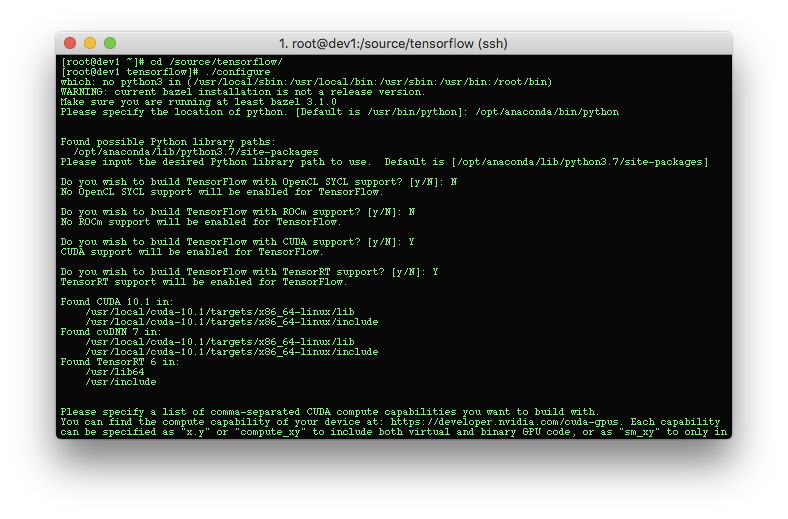
Compile
# bazel build --config=opt --config=cuda --config=noaws --config=nogcp --config=nohdfs --config=numa //tensorflow/tools/pip_package:build_pip_package

Build The Package
# ./bazel-bin/tensorflow/tools/pip_package/build_pip_package /tmp/tensorflow_pkg

Install the package
The filename of the generated .whl file depends on the TensorFlow version and your platform. Use pip install to install the package, for example:
$ pip install /tmp/tensorflow_pkg/tensorflow-2.2.0-cp37-cp37m-linux_x86_64.whl
Testing
show GPU device:


Categories: TensorFlow, Python Tags: #tensorflow, #python

Leave a comment